


In this blog post, I'll discuss my transition from Cucumber & Selenium to Playwright for frontend end-to-end testing of web applications. As a software developer, it's important for me to adequately test all parts of my web applications with modern technologies.
Why Frontend Testing
If you read some of my case studies, you'll notice that I always write tests using various techniques. Every part of a software solution requires different testing methods and techniques. For instance, I unit test backend code using JUnit. For everything visual, like web applications that end users interact with, I write frontend tests.
Frontend Testing Techniques
There are different ways to test the frontend of your web application. For example, you can test each individual component in isolation. In my case, I implement end-to-end tests for use cases. At least, that's when I'm working on web applications, which is what I assume in this blog post.
End-to-end tests are tests where you go through the flow of various functionalities and check if everything works as expected. This includes not only testing success scenarios but also scenarios where things go wrong. Think of an incorrectly filled form—in that case, you'd expect an error message.
Over the past few years, I've created these kinds of tests with Cucumber & Selenium.
End-to-End Testing with Cucumber
With Cucumber, a so-called behavior-driven development (BDD) tool, you write test scenarios in a language readable to everyone. This language is called Gherkin, here's an example scenario for TheorieGO:
Gherkin
 Gherkin
1Feature: Sign in
2
3 Scenario: Successfully authenticate with username and password
4 Given that I have navigated to the admin portal
5 When I type "admin@example.com" in the field "E-mail address"
6 And I type "************" in the field "Password"
7 And I press the button "Sign in"
8 Then the "Dashboard - TheorieGO Admin" page should be openedYou can read in fairly clear language what happens in the scenario and what's expected. However, Gherkin steps don't work magically—you need to implement them yourself.
In such a step definition, you implement the browser's behavior and can check if the result is correct. You do the latter using assertions, for example, with the assertions library Chai.js.
In the next code snippet, you see an example of a step definition. Here, I check if a specific page has opened based on the page title:
Typescript
 Typescript
1Then("the {string} page should be opened",
2 async (expectedTitle: string) => {
3 const pageTitle: string = await driver.getTitle();
4 expect(pageTitle).to.equal(expectedTitle);
5 }
6);One of the advantages of this method is that non-programmers can write scenarios themselves in Gherkin syntax.
Drawback of Cucumber for Me
Since I mostly work on relatively small projects as a freelancer, this way of frontend testing creates a lot of overhead for me. In my case, there's no need for BDD or for non-programmers to write test scenarios.
Skipping the Gherkin scenarios will save time. Additionally, I needed certain features that Cucumber, at the time of writing this blog, doesn't support. I'll explain these later.
Based on various recommendations, the features offered, the community (& support), and the fact that it's open-source and free, I decided to start using Playwright.
First Impression of Playwright
With the help of the Getting Started docs from Playwright, you can get started pretty quickly. Initially, you get an example project that you can use as a base.
In Playwright test scenarios, you do two things: perform actions and check the results (“assert the state against expectations”).
A test scenario like the one I gave in the previous Cucumber example looks like this:
Typescript
1test.describe('Sign in', () => {
2
3    test('Successfully authenticate with username and password',
4        async ({page}) => {
5            await page.goto('http://localhost:3000/login');
6            await expect(page)
7                .toHaveTitle('Sign in - TheorieGO Admin');
8
9            await page.getByLabel('E-mail address')
10                .fill('admin@example.com');
11            await page.getByLabel('Password')
12                .fill('************');
13            await page.getByRole('button', {name: 'Sign in'})
14                .click();
15
16            await expect(page)
17                .toHaveTitle('Dashboard - TheorieGO Admin');
18    });
19
20});
Using various design patterns, scenarios can be optimized, such as reusing (parts of) scenarios or selectors.
This felt quite familiar to me. The only difference compared to Cucumber was that I didn't have to write Gherkin steps.
Advantages of Playwright
For the Events Access App, it was that first time that I applied Playwright to test all flows of the web application. Here are some advantages I discovered.
Expect API
As I mentioned earlier, I previously used Chai.js for assertions. With Playwright, that's no longer necessary since it comes with a built-in assertions API.
Example:
Typescript
1await expect(page.getByText('Showing 1 to 15 of 100 results'))
2    .toBeVisible();
3await expect(exampleDomElement).toBeVisible();
Auto-Wait & Auto-Retrying
Playwright comes with a so-called auto-wait functionality. When you want to perform an action with an element, Playwright waits until that's possible—until the element is actionable. This eliminates the need for arbitrary delays.
For example, if you want to click on an element, Playwright checks if the locator exists, is visible, stable (not animating), can receive events, and is enabled:
Typescript
1await page.getByRole('button', {name: 'Inloggen'}).click();Additionally, the assertion library has auto-retrying assertions. These are assertions that are automatically retried until they pass or a timeout occurs:
Typescript
1await expect(exampleDomElement).toBeVisible();Locator API
With Playwright, there's no need to use an external selector library like Selenium. Instead, Playwright offers a variety of built-in locators.
Example:
Typescript
1const loginButton: Locator =
2    page.getByRole('button', {name: 'Inloggen'});
Code Generator & Inspector
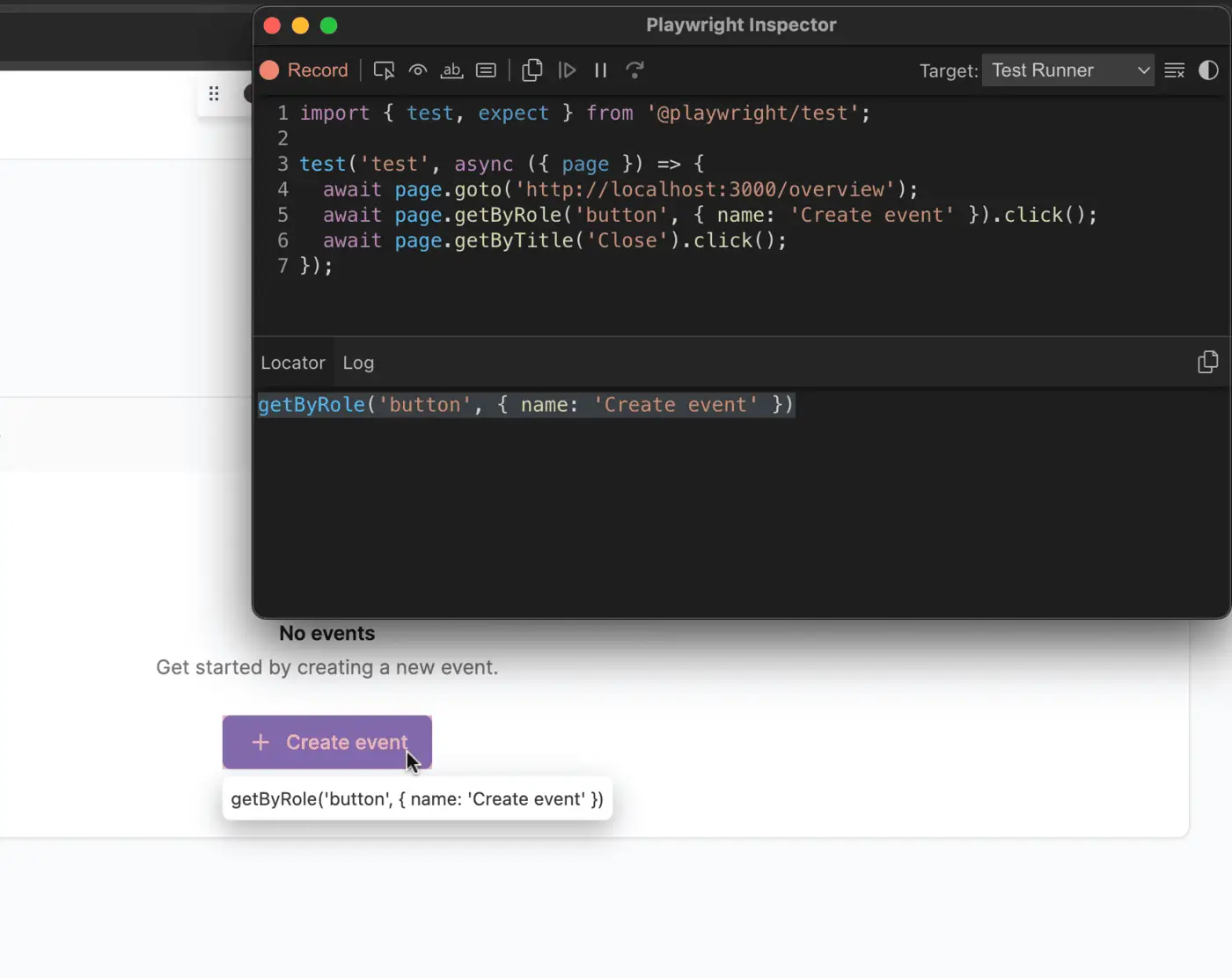
With the code generator tool, codegen, you can record flows or inspect elements to generate the right selector.
Trace Viewer & HTML Report
The Trace Viewer GUI tool lets you view traces of executed tests. You can view what the application looked like during each step of your test flow. Plus, you can search for and inspect locators from these snapshots.
Multi-Browser & Platform
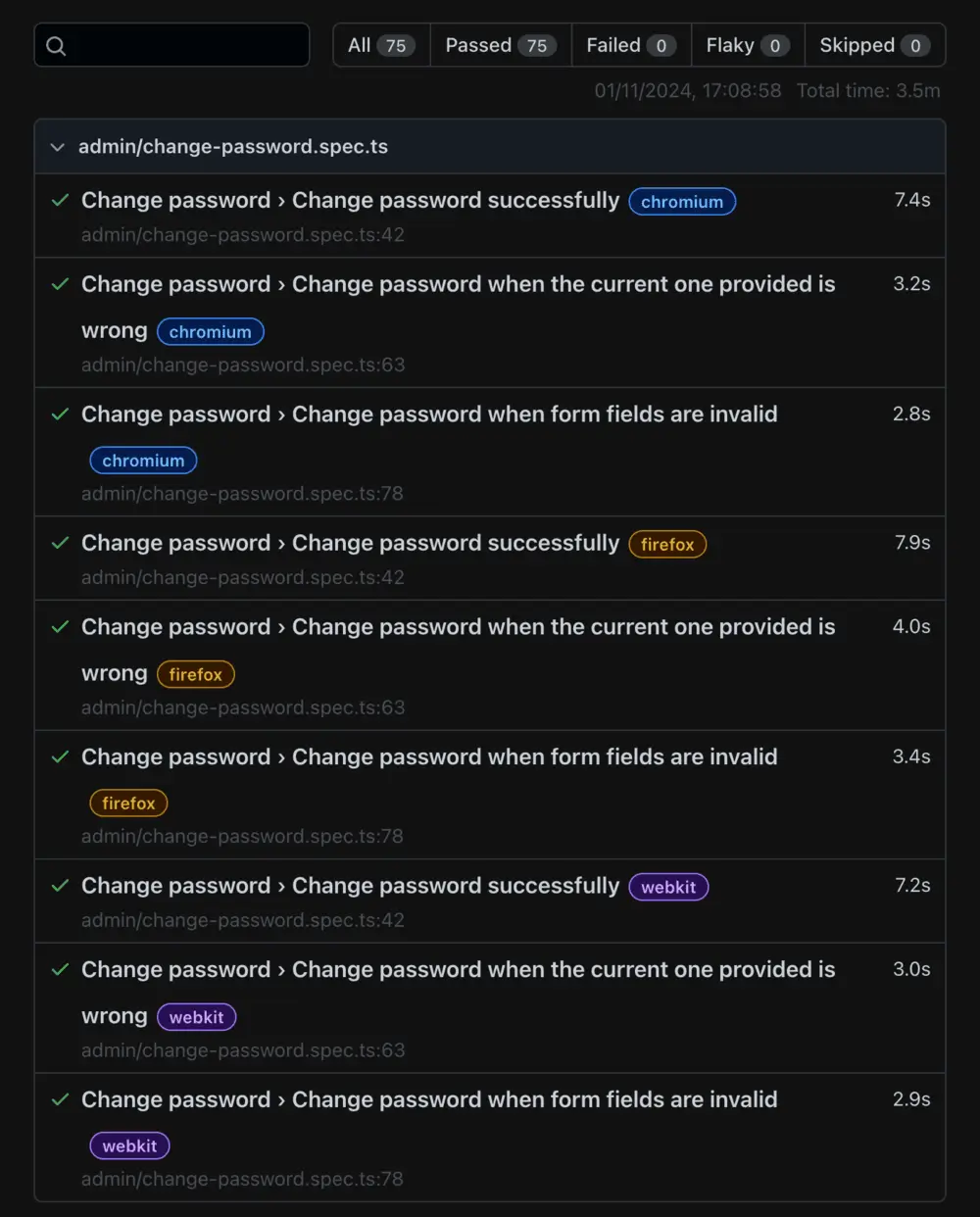
One of Playwright's main selling points is its cross-browser functionality. You can run your test cases on different rendering engines, such as Chromium, WebKit, and/or Firefox.
You can quickly set this up via the Playwright configuration file.
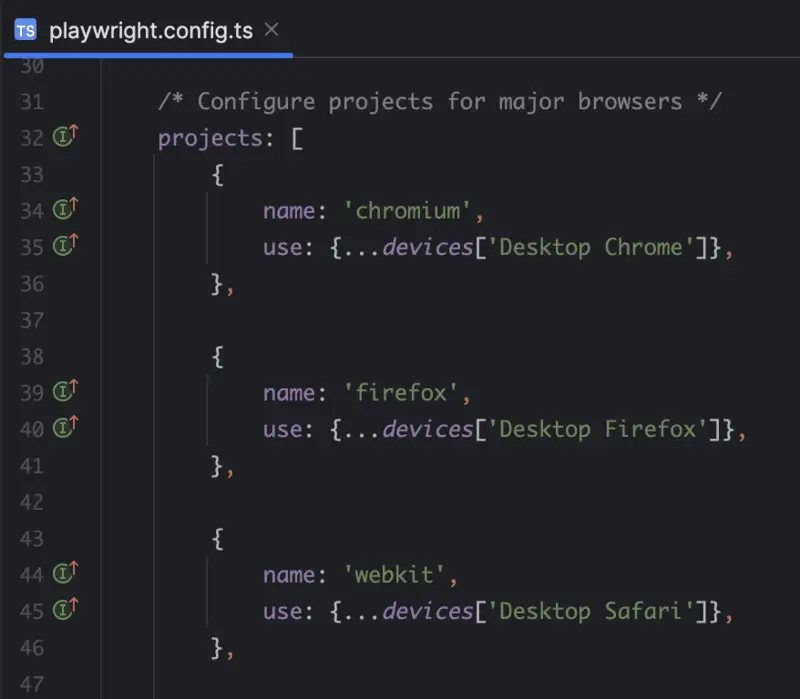
The tests will then be executed with the different engines.
Visual Comparisons
Playwright has a built-in functionality that lets you compare the visual state of the page with a screenshot. Such screenshots can be generated or updated with Playwright.
If the page doesn't look visually as expected, you can see that in the trace viewer.

Transition to Playwright
Although Cucumber (with Selenium) is a suitable framework for frontend end-to-end testing, I'll be switching to Playwright for future projects.
What tipped the scales for me are the aforementioned advantages, like the trace viewer and built-in cross-browser functionality. Additionally, it's an increasingly popular tool in the industry with a large community.
Beyond the Playwright features mentioned in this blog post, there are many more. I'll definitely be experimenting with these in the near future!


